In creating the storage solution for large datasets in Pyrus, I had independently rediscovered chunking which allows for massively faster data access in comparison to the legacy SEG-Y format that is conventionally used to store post-stack seismic data. The Heirarchical Data Format 5 (HDF5) which is maintained by the HDF Group provides native library code for storing and accessing large scientific datasets using chunking. Why re-invent the wheel when you can simply use a battle-tested and proven solution? The HDF Group also provide wrappers for a variety of different programming languages, including Java.
In addition to chunking, one of the advantages of the HDF5 format is that it allows per chunk compression. Rather than compressing the entire file, each chunk that is stored can be individually compressed. This reduces the file size whilst still allowing fast random access through the chunks. It’s perhaps the best of both worlds. These days there are some exceptional compression algorithms out there, both offering lossless compression for floating point data, or near-lossless with huge compression ratios. The ZFP compression algorithm for multi-dimensional floating point data arrays is an example of such an algorithm, and I was keen to examine whether this would help reduce file access time even further in Pyrus. After all, if there are fewer bytes to read, then in theory reading data should be faster; assuming of course that the decompression computational overhead does not outweigh the read time advantages!
So naturally I thought I would test out HDF5 chunking and compression on seismic datasets to see if it was possible to accelerate the input/output throughput further than can be achieved with chunking along.
In the standard native-wrapped JNI libraries this is all possible. You can read and write a variety of different chunked compression formats through the use of plugins that have been written to support HDF5 files. If you are like me then you might not know about many of these compression formats. Most of us are familiar with .zip files which help to compress files and directories, and have been around for decades. In the background there has been a great deal of advancement in the field of compression. I was keen to try out some of the newer ones I’d never heard about.
- LZ4: A lossless compression algorithm with a focus on compression and decompression speed.
- Zstandard: Another fast lossless compression algorithm that can achieve a higher compression ratio compared to LZ4, at the cost of a tradeoff in decompression speed. It was developed at Facebook and released as open source.
- ZFP: A lossy compression algorithm designed specifically for very high compression of floating point data. According to the images on their website it appears this can achieve compression from 64-bits per value (a conventional double-precision floating point number) down to 0.56 bits per value. Yes… you read that right. Less than a single bit per value.
Following my adventures into chunking I had primarily adopted the use of the jHDF library for reading HDF5 files. This posed a dilemma for me as jHDF cannot natively decompress HDF5 datasets that use many of the compression plugins. This meant I would have to first test out the proof of concept using the JNI HDF5 wrappers, and then work out whether I could implement decompression in jHDF separately. At the outset of the journey this was a somewhat daunting proposition as I was far from an expert on compression algorithms, let alone the low-level aspects of the HDF5 format.
To cut a long story short, I managed to get it working. This post documents the journey I undertook in developing an extension to jHDF that allows for reading of chunked HDF5 files using the same plugins that are distributed for the native HDF5 library. There were several new discoveries for me along the way. Who knows, perhaps someone else may one day find this useful. At the very least, I think it’s an interesting technical solution.
The Challenge of Reading Compressed Datasets
I’m a fan of jHDF. I’m possibly a little biased because the developer gave my profiling of jHDF against other HDF libraries in Java a shout out on the GitHub page. The truth is that jHDF is pure Java, which is a preference of mine where possible, and it permits multi-threaded reading. On a modern SSD this does allow great improvement in random access to files and it is thus essential for an effective HDF5 reader (in my opinion). The downside of the pure Java implementation is that not every single feature in HDF5 has been implemented. Most notably the weak spot that becomes painfully obvious the moment you start working with real datasets is that it cannot decompress most datasets that rely on external HDF5 filter plugins. An LZ4 decompression capability was recently added as jHDF was able to leverage a Java LZ4 library, but several other compression codecs have no Java library equivalents.
The breakthrough came from noticing that jHDF does have a few fundamentally useful components.
- It exposes the compressed chunk bytes exactly as they appear in the file. You can get the compressed chunk as-is.
- It tells you which filter was used, and provides the
cd_valuesarray that describes the compression parameters. - It has a FilterManager class that allows for dynamic registration of filters at runtime without the need to fork and recompile the jHDF source.
Assuming you had an implementation of your filter of choice in Java, this means that you could in theory just write a filter class that takes the compressed bytes, applies decompression using your implementation and the parameters embedded in the HDF5 for that filter, and obtain the uncompressed original data. In other words, jHDF hands you everything you need to perform decompression with the notable exception that it can’t load the native HDF5 filter plugins required for decompression and it does not provide a large number of pure Java alternatives.
The Big Idea
Solving the problem is like an advanced Sudoku problem. You kind of know there is a solution, but it’s not immediately obvious. And it is like an intellectual black hole that sucks you in. At least that was my experience.
The idea that came to me was to try to tie together the JNI HDF5 wrappers that can handle compression and decompression with jHDF. Yes, it would something of a Frankenstein solution. No longer pure Java, but hopefully maintaining the parallel read speed advantage. The best of both worlds? Parallel read speed plus use any standard published filter for HDF5. Yes please.
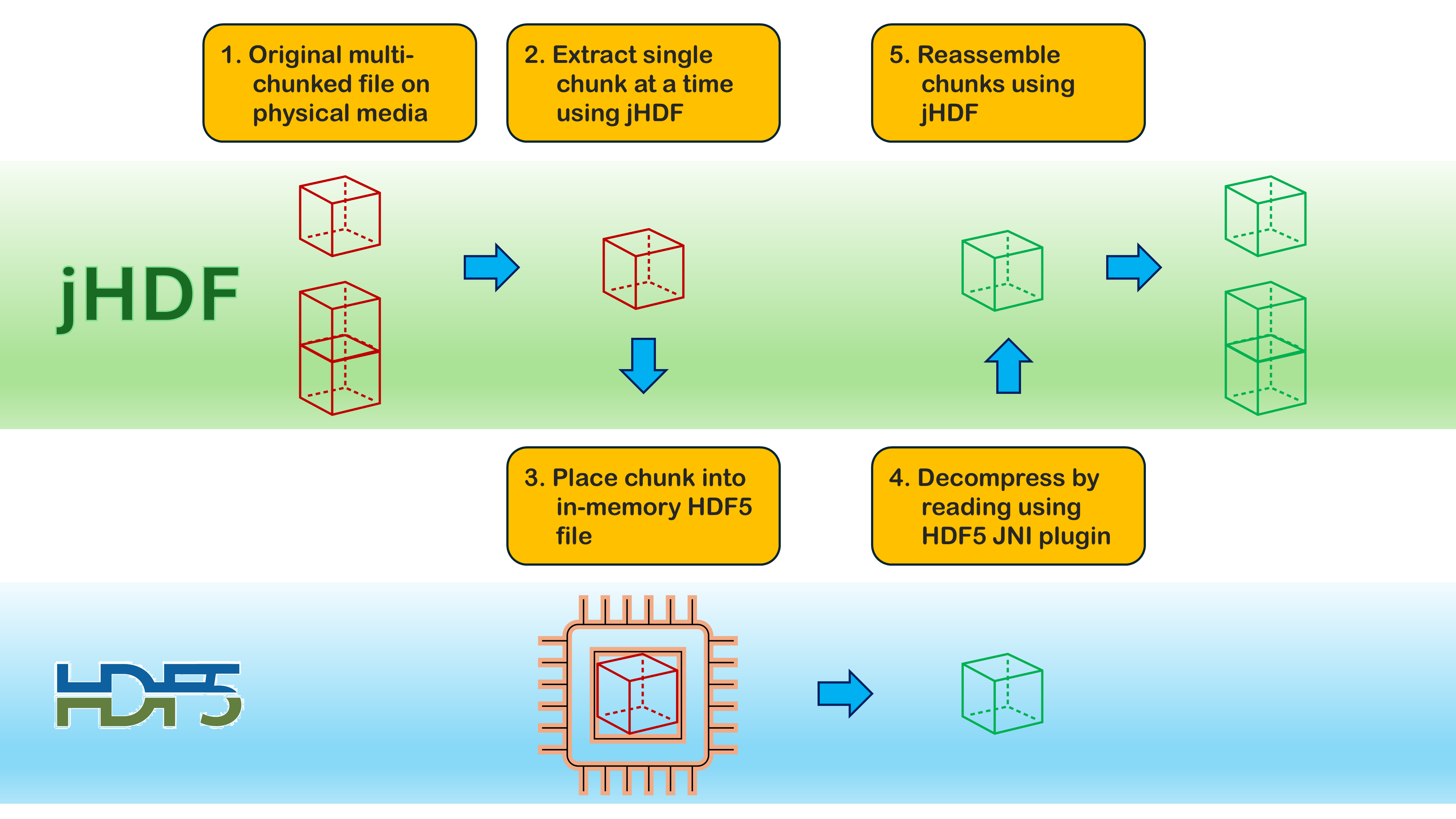
So the logic was that using Java I would call the native HDF5 library directly. All that was needed was to feed the compressed bytes into a HDF5 file configured such that it identified it was using the relevant filter compression for chunked storage, and then let the library do all the work by reading the file. Decompression should happen automatically.
All fine in theory. Not quite as rosy in practice.
In the jHDF camp the filter manager would pass information about the filter settings being used, but omitted important information such as the chunk dimensions and the type of data that had been compressed. Somehow we would need to get this information passed to the filter if it were to work. It is impossible to store the information in the filter itself as the filter is just an instance that isn’t associated with a dataset or a chunk. Static values might work, but due to concurrency you could never guarantee the right values would be used in a parallel environment, especially where chunk dimensions might be different at the edges of a volume. Forking jHDF and re-writing the filter mechanism itself was always an option, albeit one in the sledgehammer to crack a nut category.
Meanwhile in the JNI HDF camp things weren’t much better. Firstly how do you write a chunk that is already compressed into a dataset for which you have set the correct flags to identify the compression filter being used, but without compressing the chunk as you save it? Turns out that there are methods available to do just that, but they are not exposed by the JNI HDF bindings… so how do you call native methods directly without the Java Native Interface?
Solution Overview
The final design was surprisingly elegant. The first issue was solved quite simply by using a ThreadLocal context to pass the missing metadata, including chunk dimensions and datatype, into jHDF’s filter system. This technique is quite clever. The ThreadLocal context provides access to storage between objects in the same thread, and ensures data is not shared between threads. Since the read and the filter operation take place on the same thread, we can use a ThreadLocal context to smuggle information across into the filter for each individual chunk. From a code perspective this is a little more fiddly than just a single liner, as additiona code is needed to configure the environment before reading from the compressed file. On the other hand, it only needs to be done once and it isn’t that complex.
Now that we could be assured that any and all parameters that might be needed to be passed to a decompression filter would be available, all we then needed to do was use the native library methods to do the decompression for us. This turns out to be harder than maybe it should be. If you are using the Java Native Interface wrapper methods that are provided with the official HDF5, you will very quickly discover that whilst the C native programmers get access to all the toys, not all methods are exposed with the JNI wrappers. To create an in-memory file configured to use a specific compression filter and sneak in compressed bytes to a chunk without triggering compression on the way required a specific method that is not available via JNI. So what to do?
The answer lies in Java’s Foreign Function and Memory (FFM) API which was officially introduced from Java 22+. Using FFM allows Pyrus to bind directly to the HDF5 C library. In doing so we gain access to the same functions that the official HDF5 tools use internally. Happy days.
With those pieces in place, decompression becomes a matter of creating a tiny HDF5 file in memory, sneakily writing the compressed chunk into it, then asking HDF5 to read it back. HDF5 dutifully runs the correct decompression plugin, and the result is returned to jHDF as ordinary Java bytes. We can then pass this back to the jHDF filter manager which assembles all the chunks that are being read and decompressed in parallel. The whole process is invisible to the user, and jHDF remains completely untouched.
In summary Pyrus implements native decompression in jHDF using four components:
-
Thread‑local filter context Injects missing metadata (chunk dimensions, datatype) into jHDF filters.
-
Native HDF5 bindings using Java FFM Provides access to
H5Dread,H5DOwrite_chunk,H5Pset_filter, etc. -
In‑memory HDF5 file creation Builds a tiny HDF5 file containing exactly one chunk.
-
Native decompression via HDF5 itself Writes the compressed chunk into the file, then calls
H5Dreadto decompress.
This approach requires no modifications to jHDF as it just registers native-capable filters using the existing jHDF mechanics, and supports all HDF5 compression plugins installed on the system.
1. Passing Missing Metadata into jHDF Filters
One of the quirks of jHDF is that its filter API is intentionally minimal. Filters receive only the compressed bytes and the cd_values array. Specifically:
byte[] encoded_dataint[] filter_data
That’s fine for simple filters, but native decompression needs more context including the chunk dimensions, the datatype, and the number of elements in the chunk. This presents a challenge as to how to obtain these parameters so that decompression can actually be used.
Rather than modifying jHDF, Pyrus uses a thread‑local holder. Just before jHDF reads a chunk, Pyrus stores a small object containing the missing metadata. Because jHDF invokes filters synchronously on the same thread, the filter can retrieve this context safely and reliably. It’s a neat trick that avoids any need to fork or patch jHDF.
public class Hdf5FilterContextHolder {
    public static final ThreadLocal<Hdf5FilterContext> CTX = new ThreadLocal<>();
}
Before jHDF reads a chunk:
Hdf5FilterContextHolder.CTX.set(
    new Hdf5FilterContext(dataset.getChunkDimensions(), dataset.getDataType())
);
byte[] result = dataset.getData();
Hdf5FilterContextHolder.CTX.remove();
This avoids modifying jHDF and ensures filters have the metadata they need.
2. Native HDF5 Access Using Java FFM
The heavy lifting happens inside a small utility class that binds directly to the HDF5 C API using Java’s Foreign Function & Memory API. This gives Java the ability to call functions like H5Dread, H5DOwrite_chunk, H5Pset_filter, and H5Screate_simple exactly as a C program would. Once those bindings exist, Java can create datasets, write chunks, and read them back — all using the real HDF5 library.
This is the heart of the solution. Instead of trying to replicate HDF5’s behaviour, Pyrus simply asks HDF5 to decompress the chunk itself. The class Hdf5Native binds directly to the HDF5 C API using Java’s Foreign Function & Memory API. For example we create a low-level native binding class that includes method signatures for each of the C API methods we want to use (only H5DOwrite_chunk is shown in this snippet):
/**
 * A small utility class to load HDF5 native library plugin and create a MethodHandle for various routines. This allows
 * us to access the compression and decompression algorithms embedded in various native libraries via plugins.
 *
 * @author Peter Kirkham
 */
@SuppressWarnings("restricted")
public final class Hdf5Native {

    /* == DEFINE CONSTANTS == */
    public static final Hdf5Native INSTANCE = new Hdf5Native();
    private static final Linker LINKER = Linker.nativeLinker();
    private static final MethodHandle H5D_WRITE_CHUNK;
    private static final Object HDF5_LOCK = new Object();

    @FunctionalInterface
    public interface Hdf5Callable<T> {
        T call() throws Throwable;
    }

    public static <T> T call(Hdf5Callable<T> fn) {
        synchronized (HDF5_LOCK) {
            try {
                return fn.call();
            } catch (Throwable t) {
                throw new RuntimeException(t);
            }
        }
    }

    static {

        // Create full path to the native library. We can leverage our Installer class which knows the native library
        // path location which was identified during module startup when the JNI modules were loaded.
        Path hdf5_hl_lib = Paths.get(Installer.native_dir.concat(System.mapLibraryName("hdf5_hl")));
        HDF5_HL = SymbolLookup.libraryLookup(hdf5_hl_lib.toAbsolutePath().toString(), Arena.global()); // high-level lib

        H5D_WRITE_CHUNK = LINKER.downcallHandle(
                HDF5_HL.find("H5DOwrite_chunk").orElseThrow(),
                FunctionDescriptor.of(
                        ValueLayout.JAVA_INT, // herr_t (returns status)
                        ValueLayout.JAVA_LONG, // hid_t dset_id
                        ValueLayout.JAVA_LONG, // hid_t dxpl_id
                        ValueLayout.JAVA_INT, // uint32_t filters
                        ValueLayout.ADDRESS.withTargetLayout(ValueLayout.JAVA_LONG), // const hsize_t *offset
                        ValueLayout.JAVA_LONG, // size_t data_size
                        ValueLayout.ADDRESS // const void *buf
                )
        );
    }

    public static MethodHandle h5dWriteChunk() {
        return H5D_WRITE_CHUNK;
    }
This gives Java full access to HDF5 native methods without JNI including:
H5DreadH5DOwrite_chunkH5Pset_filterH5Pset_chunkH5Screate_simpleH5Dcreate2H5Fcreate
These bindings are the backbone of native decompression. We can then also wrap these native bindings in a more friendly method that is easier to call from within Java. For our H5DOwrite_chunk method we can create a writeSingleChunk helper method:
private final Hdf5Native native_api;

/**
 * Write a chunk with raw bytes (no compression is applied).
 *
 * @param arena
 * @param dset_id
 * @param compressed
 * @param offset
 */
public void writeSingleChunk(Arena arena, long dset_id, byte[] compressed, long[] offset) {
    Hdf5Native.call(() -> {
        MethodHandle h5do_write_chunk = native_api.h5dWriteChunk();
        MemorySegment offset_seg = arena.allocate(
                ValueLayout.JAVA_LONG.byteSize() * offset.length,
                ValueLayout.JAVA_LONG.byteAlignment());
        for (int i = 0; i < offset.length; i++) {
            long off = (long) i * ValueLayout.JAVA_LONG.byteSize();
            offset_seg.set(ValueLayout.JAVA_LONG, off, offset[i]);
        }
        MemorySegment comp_seg = arena.allocate(ValueLayout.JAVA_BYTE, compressed.length);
        comp_seg.copyFrom(MemorySegment.ofArray(compressed));
        int status = (int) h5do_write_chunk.invokeExact(
                dset_id,
                HDF5Constants.H5P_DEFAULT,
                0, // filter_mask = 0 -> apply all filters on read
                offset_seg,
                (long) compressed.length,
                comp_seg);
        if (status < 0) {
            native_api.dumpHdf5Error();
            throw new HdfFilterException("H5Dwrite_chunk failed");
        }
        return null;
    });
}
3. Create an In‑Memory HDF5 File Containing Compressed Chunk
To decompress a chunk, Pyrus first creates a tiny HDF5 file entirely in memory. It contains a single dataset, with a dataspace matching the chunk dimensions and a dataset creation property list that mirrors the original filter pipeline. This file exists only long enough to perform decompression, but it behaves exactly like a normal HDF5 file. The HDF5 file structure is very simple as it contains just a single dataset with size of precisely one chunk, with the correct filter properties set for that chunk.
Now the trick is to get our compressed bytes from jHDF into the in-memory file that we have created. Just writing the bytes won’t work as that will re-compress bytes that are already compress. What we actually need to do is to slip the compressed bytes into memory bypassing the compression on the way in. We can do this by writing using H5DOwrite_chunk native method:
hdf5.writeSingleChunk(arena, dset_id, encoded_data, offset);
This bypasses HDF5’s compression pipeline and stores the raw compressed chunk.
4. Decompressing a Chunk Using a Native Plugin
Once we have our compressed chunk bytes sitting in an in-memory HDF5 file, all we need to do is call our helper method that binds to the native read method on that file. HDF5 will use the plugins available to it to to decompress the chunk using native code. This gives jHDF access to a wide range of native decompression plugins, including ZStandard, ZFP, LZ4 etc.
byte[] decompressed = hdf5.readDatasetToBytes(arena, dset_id, type_id, element_count);
The result is returned to jHDF as a normal byte array. The complete decompression method is as follows, and is hopefully commented well enough for anyone interested enough to follow.
/**
 * Decompress a chunk using HDF5’s internal filter pipeline.
 *
 * @param compressed the raw compressed bytes from jHDF
 * @param filter_id the HDF5 filter ID (e.g., 32012 for ZFP)
 * @param cd_values the filter parameters (same ones used when writing)
 * @param chunk_dims size of the chunk
 * @param type_id HDF5 type (H5T_NATIVE_FLOAT or H5T_NATIVE_DOUBLE)
 */
public static byte[] decompressWithHdf5(byte[] compressed, int filter_id, int[] cd_values, int[] chunk_dims,
        long type_id) {

    // First generate a hash for these compressed bytes and check if it has been decompressed and is in the cache.
    long hash = Arrays.hashCode(compressed);
    byte[] cached = CACHE.get(hash);
    if (cached != null) {
        return cached;
    }

    // Didn't find the decoompressed chunk in the cache so we'll need to decompress it.
    if (!(type_id == HDF5Constants.H5T_NATIVE_FLOAT || type_id == HDF5Constants.H5T_NATIVE_DOUBLE)) {
        LOG.log(Level.WARNING, "type_id is not H5T_NATIVE_FLOAT or H5T_NATIVE_DOUBLE", new Object[]{});
    }
    long element_count = computeElementCount(chunk_dims);
    try (Arena arena = Arena.ofConfined()) {
        Hdf5 hdf5 = new Hdf5(Hdf5Native.INSTANCE);

        /*
         * We will leverage HDF5 native functions to achieve decompression. This is achieved through the following
         * pipeline:
         *  1. Create an in-memory HDF5 file which we can apply normal HDF5 methods to. The trick is that thie file
         *     will be exactly one chunk in size.
         *  2. Create a simple 1D dataspace for the decompressed chunk.
         *  3. Create dataset creation property list with the appropriate compression filter information.
         *  4. Create dataset that represents the chunk.
         *  5. Copy our compressed bytes into the chunk dataset.
         *  6. Read the file (which is essentially a single compressed chunk) and HDF5 applies decompression to get
         *     the output.
         *  7. Clean up and release resources.
         */
        // 1. Create an in-memory HDF5 file.
        long file_id = hdf5.createCoreFile(64 * 1024);

        // 2. Create a simple 1D dataspace for the decompressed chunk.
        long[] dims = new long[]{chunk_dims[0], chunk_dims[1], chunk_dims[2]};
        long space_id = hdf5.createSimpleDataspace(arena, dims);

        // 3. Create dataset creation property list with the appropriate compression filter information.
        long dcpl_id = hdf5.createChunkedFilteredDcpl(arena, dims, chunk_dims, filter_id, cd_values);

        // 4. Create dataset.
        long dset_id = hdf5.createDataset(arena, file_id, "chunk", type_id, space_id, dcpl_id);

        // 5. Write compressed bytes directly into the dataset for a single chunk (all offsets are zero).
        long[] offset = {0, 0, 0}; // for a single chunk
        hdf5.writeSingleChunk(arena, dset_id, compressed, offset);

        // 6. Read decompressed bytes.
        byte[] decompressed = hdf5.readDatasetToBytes(arena, dset_id, type_id, element_count);

        // 7. Cleanup.
        hdf5.closeDataset(dset_id);
        hdf5.closeDataspace(space_id);
        hdf5.closePlist(dcpl_id);
        hdf5.closeFile(file_id);

        // Store our decompressed chunk in the cache and return.
        CACHE.put(hash, decompressed);
        return decompressed;
    } catch (Throwable t) {
        throw new HdfFilterException("HDF5-driven decompression failed", t);
    }
}
Building a Native Filter for jHDF
Behind the scenes, the framework is now in place to leverage native filter plugins. Filter classes can be registered with the jHDF library, and only require two methods to be over-ridden. We create an abstract base class for our native filters that handles all the heavy lifting to identify the filter by name, and to transform the encoded data into decoded bytes. Notice how the ThreadLocal context is accessed in a similar fashion to a static class, but in reality it is static only to that chunk’s thread.
/**
 * Plugin filter for jHDF library that utilises the HDF5 internal functions to compress and decompress chunks using the
 * the native algorithm that is built into JNI or available via a plugin. This filter calls decompression routines that
 * are embedded in the native libraries by decompressing the compressed bytes read by jHDF via an in-memory file that is
 * precisely one chunk in size.
 *
 * @author Peter Kirkham
 */
public abstract class Hdf5NativeFilter implements Filter {

    @Override
    public String getName() {
        return Hdf5Filter.fromId(getId()).desc();
    }

    @Override
    public byte[] decode(byte[] encoded_data, int[] filter_data) {
        Hdf5FilterContext ctx = Hdf5FilterContextHolder.CTX.get();
        if (ctx == null) {
            LOG.log(Level.WARNING, "The HDF5 filter context was not set before using this plugin filter. It is not "
                    + "possible to determine required information about chunk sizing without this context.",
                    new Object[]{});
            throw new IllegalStateException("No HDF5 filter context available");
        }
        long type_id = mapDatatype(ctx.datatype);
        final byte[] decompressed_data = Hdf5NativeDecompress.decompressWithHdf5(
                encoded_data,
                getId(),
                filter_data,
                ctx.chunk_dims,
                type_id
        );
        return decompressed_data;
    }

    private static long mapDatatype(DataType dt) {
        if (dt.getDataClass() == FloatingPoint.CLASS_ID) {
            int size = dt.getSize();
            switch (size) {
                case 4:
                    return HDF5Constants.H5T_NATIVE_FLOAT;
                case 8:
                    return HDF5Constants.H5T_NATIVE_DOUBLE;
                default:
                    throw new IllegalArgumentException("Unsupported FLOAT size: " + size);
            }
        }
        throw new IllegalArgumentException("Only 32-bit and 64-bit floating-point datatypes are currently supported");
    }
}
It turns out that for each specific implementation of a native filter, providing the native plugin is available, then registering it with the jHDF filter manager is only a few lines.
For example to register a Zstandard filter:
@ServiceProvider(service = Filter.class)
public class ZstdFilter extends Hdf5NativeFilter {
    @Override
    public int getId() {
        return Hdf5Filter.ZSTANDARD.id();
    }
}
ZFP is almost identical:
@ServiceProvider(service = Filter.class)
public class ZfpFilter extends Hdf5NativeFilter {
    @Override
    public int getId() {
        return Hdf5Filter.ZFP.id();
    }
}
Our pipeline has become:
- {compression filter for specific compression algorithm} ->
- {extends abstract jHDF filter for native plugins} ->
- {calls decompression method with sequence of steps required expected by native API} ->
- {uses helper method for each step that translates Java types and data into native format and memory addresses} ->
- {native FFM bindings for each native API method needed}
In Pyrus I have not implemented filters for each and every compression algorithm that is out there in the wild. This is principally because I currently don’t have a need for that. As can be seen, adding new filters is embarrasingly simple.
Performance
To examine the performance of different compression methods using HDF5, a comparison suite of files was created from the same original 3D seismic file. This is a SEG-Y file, encoded using IBM floating point, with 1,966 inlines by 1,103 crosslines, and 3,001 samples per trace. The file is 24.4 GB in size. Four different HDF5 volumes have been created from this SEG-Y volume:
- Uncompressed dataset using IEEE 32-bit floating point values
- LZ4 compression
- ZFP compression mode 1 (fixed precision value = 0.5)
- Zstandard compression
The HDF5 file reading is compared for both the native wrapper JNI HDF5 methods and the jHDF methods. Note that LZ4 is implemented in jHDF using a pure Java library, whereas ZFP and Zstandard both use their respective Hdf5NativeFilter as described in this post.
A combination of random inlines, crosslines and slices is read for each file type and method. Speeds are all measured in average µs/float. Lower is better.
| Method | Inline | Crossline | Slice | Average |
|---|---|---|---|---|
| SEG-Y | 0.026283 | 0.036271 | 61.36598 | 20.47618 |
| Uncompressed HDF5 (JNI HDF) | 0.788072 | 0.063627 | 0.208531 | 0.353410 |
| Uncompressed HDF5 (jHDF) | 0.936527 | 0.056577 | 0.150519 | 0.381208 |
| Compressed LZ4 HDF5 (JNI HDF) | 4.941478 | 0.091797 | 0.256583 | 1.763286 |
| Compressed LZ4 HDF5 (jHDF) | 1.766712 | 0.068305 | 0.178280 | 0.671099 |
| Compressed ZFP HDF5 (JNI HDF) | 2.119390 | 0.205730 | 0.612129 | 0.979083 |
| Compressed ZFP HDF5 (jHDF) | 2.843839 | 0.271968 | 0.607148 | 1.240985 |
| Compressed ZSTD HDF5 (JNI HDF) | 0.502039 | 0.295493 | 1.058890 | 0.618807 |
| Compressed ZSTD HDF5 (jHDF) | 0.897132 | 0.518139 | 1.336501 | 0.917257 |
It can be seen that compression, whilst overall it can reduce the file sizes associated with seismic data (particularly for ZFP), there is no benefit gained from reading of the data. On average, uncompressed read times for chunked HDF5 data is fastest. It can also be observed that the pure Java implementation of the LZ4 compression is faster than the wrapped JNI native method. This relative performance is reversed when using the native filter plugins directly from within Java rather than via the JNI wrapper for ZFP and Zstandard compression.
Summary
Pyrus now supports full native HDF5 decompression inside jHDF by combining a thread-local metadata layer with Java’s Foreign Function & Memory API. Compressed chunks are written into a tiny in-memory HDF5 file and read back using the real HDF5 decompression plugins. The result is robust, and completely transparent to the user. Sadly the hoped for gains in speed were not realised. But that’s the nature of trying new approaches. Sometimes they work, other times they don’t. But if you don’t look and measure you’ll never know for sure.
An interesting aspect of the approach used is that it required no changes to jHDF since it just leverages the filter manager system within that library. Furthermore, the approach used to develop the native filter means that it is easily extended to other plugin filters that are supported by the native HDF5 installation.
In my opinion this is a good example of how modern Java can integrate deeply with native scientific libraries. The once oft-heard criticism that Java is slow, and for real work you need a proper language (C/C++, Fortran, or increasingly these days… Rust) does not hold as true any more. You can have your cake and eat it; running native high-performance code for core functionality alongside a main application within the Java Virtual Machine.